How It Works
The morphace command takes two face images and generates an MP4 video that
gradually transforms the first face into the second. Each input image must
contain at least one face that dlib can detect.
Image Normalization
Section titled “Image Normalization”Before morphing begins, Morphace normalizes the two images so they have matching dimensions. If one image is smaller in both width and height, the larger image is downscaled and center-cropped to match it. If the images have mixed dimensions, both are center-cropped to their shared minimum width and height.
Morphing Pipeline
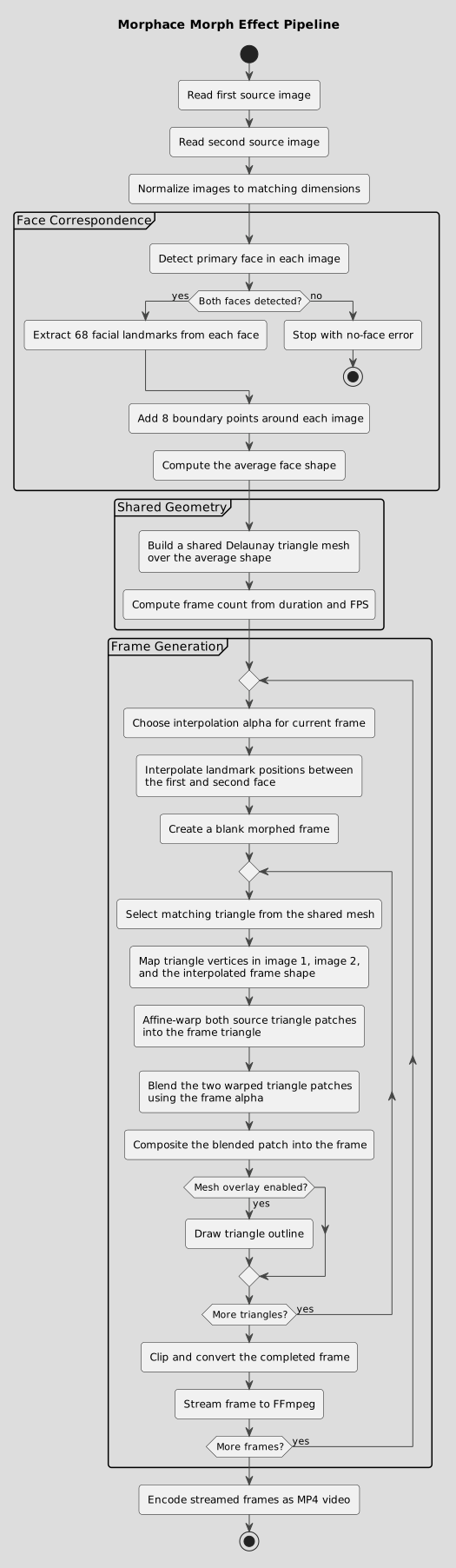
Section titled “Morphing Pipeline”Morphace creates each video frame with a triangle morphing pipeline:
- Detect the primary face in each input image.
- Extract 68 facial landmarks from each detected face.
- Add 8 boundary points around the image so the full frame can be warped.
- Compute an average face shape from the two landmark sets.
- Build a shared Delaunay triangle mesh over the average shape.
- Interpolate landmark positions between the first and second face.
- Warp matching triangles from both source images into the frame shape.
- Blend the two warped triangle patches together.
- Repeat this for every triangle to produce the completed frame.
The frame count is based on the selected duration and frame rate. With the
defaults, --duration 5 and --fps 30, Morphace generates 150 frames. The
first frame matches the first image, the last frame matches the second image,
and the frames between them move through evenly spaced steps.
Process Flow
Section titled “Process Flow”